

Stake App: Easy Install Guide for iOS & Android
There isn’t an official APK file or Stake app. We will show you how to add a shortcut of the site to your phone in under 2 minutes instead. Learn how to easily download the Stake browser app to seamlessly play on mobile.

Stake Mobile App
Use Stake on iOS and Android through the mobile browser app
Add Stake to your home screen
No download
PWA shortcut
~2 min setup
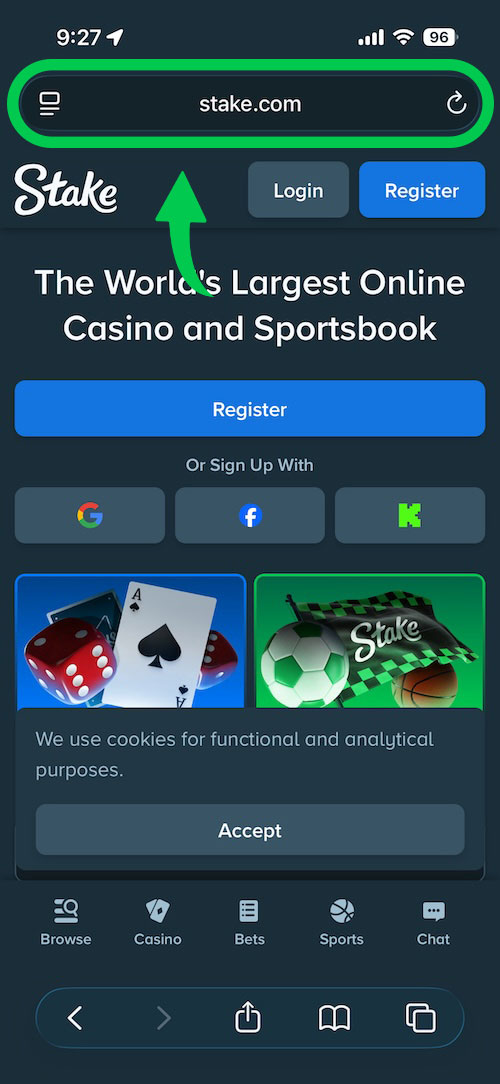
Step 1 of 6
Open Stake in Safari
Go to stake.com or stake.us in Safari on your iPhone or iPad.
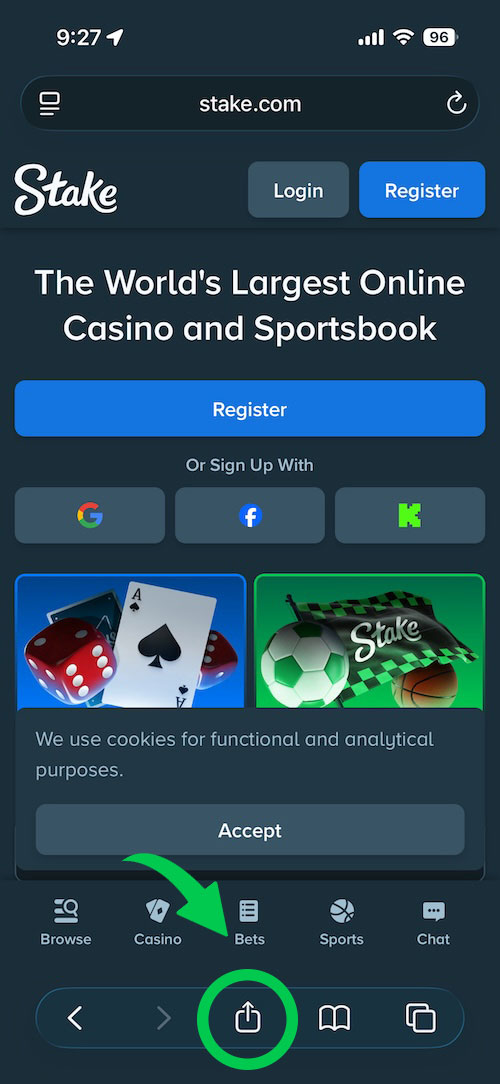
Step 2 of 6
Tap the Share button
Tap the Share icon at the bottom of Safari (square with an arrow pointing up).
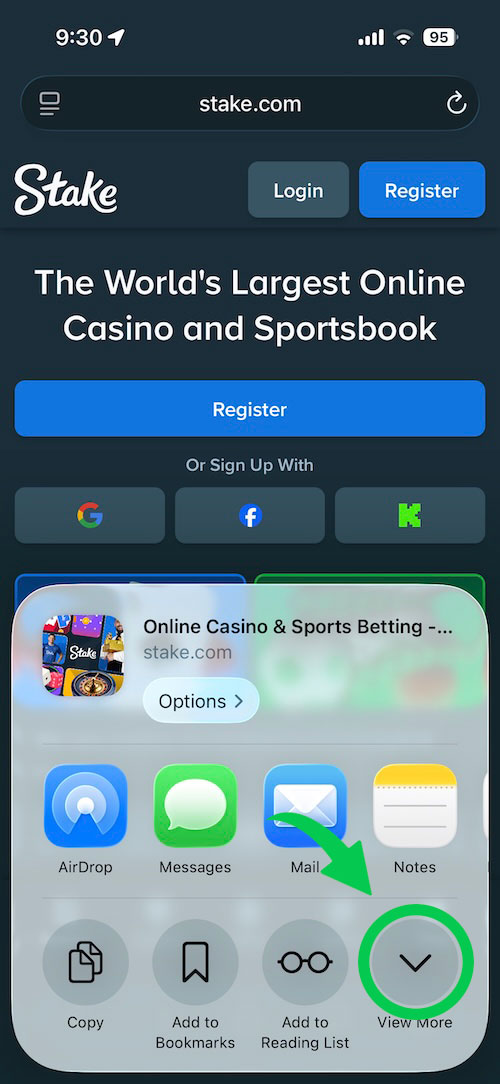
Step 3 of 6
Tap View More
In the share menu, tap “View More” to reveal additional options.
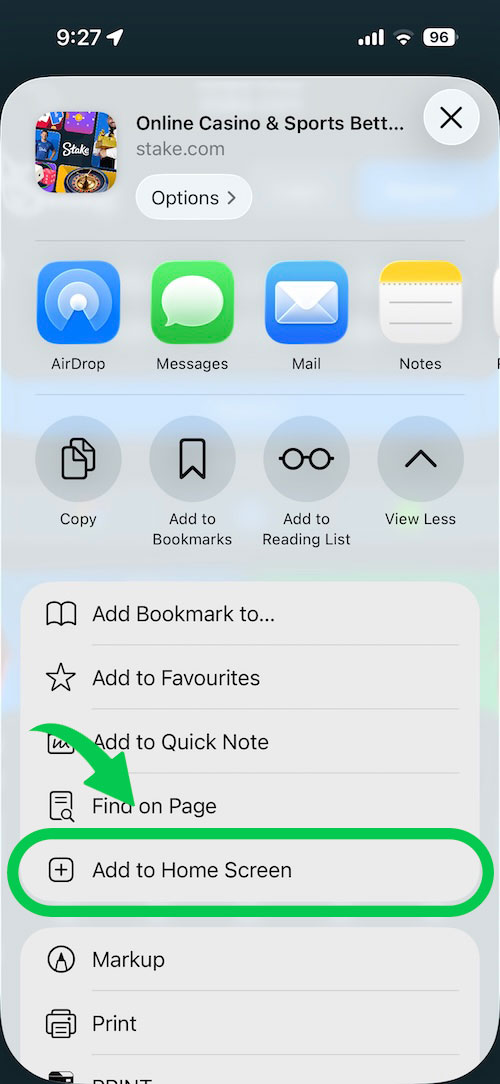
Step 4 of 6
Add to Home Screen
Scroll the share menu and tap “Add to Home Screen”.
Step 5 of 6
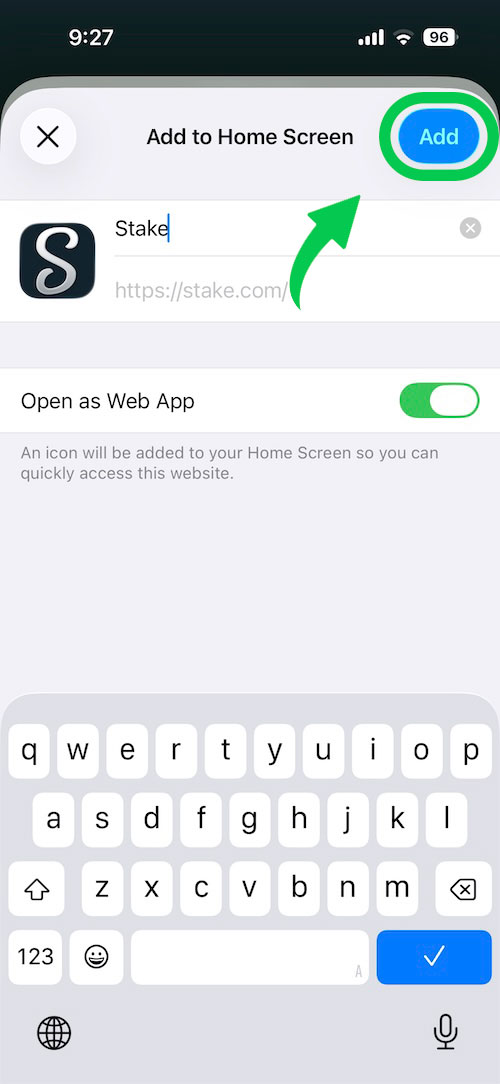
Confirm the shortcut
Edit the name if you like, then tap “Add” in the top-right corner.
Step 6 of 6
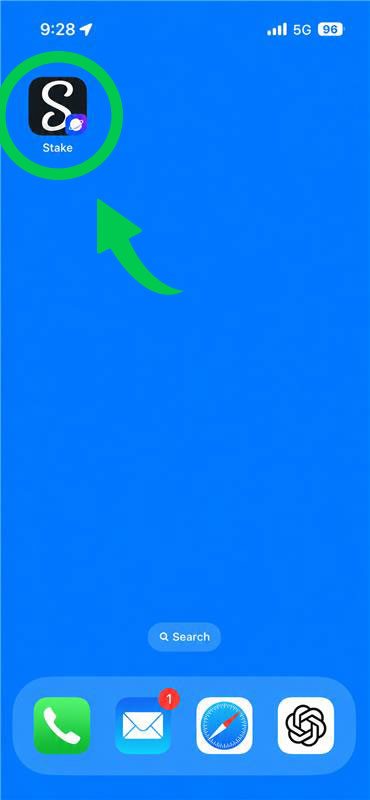
Launch from your home screen
Find the Stake icon on your home screen and open it like any other app.
Tip: Use Safari for “Add to Home Screen”. Chrome on iOS may not offer the same shortcut.
Step 1 of 6
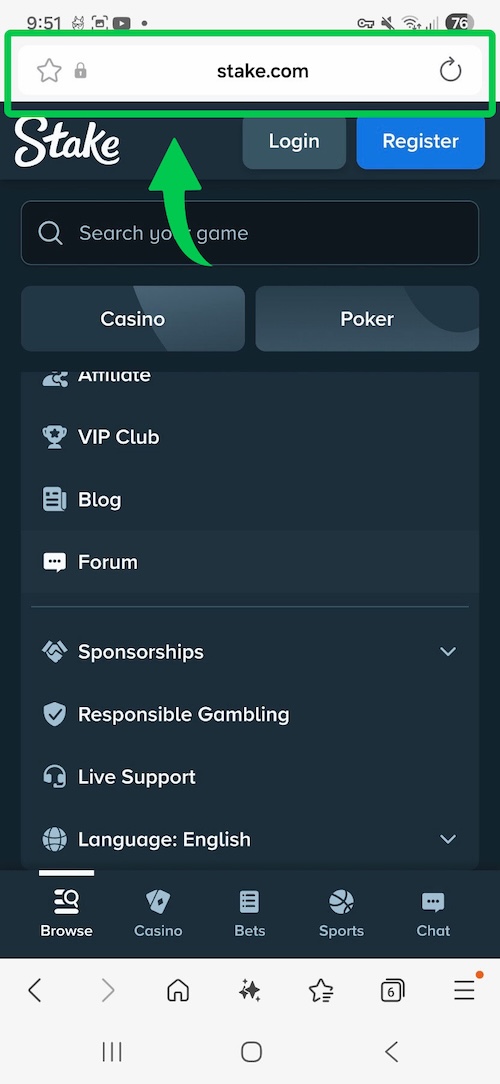
Open Stake in Chrome
Visit stake.com or stake.us in Google Chrome on your Android device.
Step 2 of 6
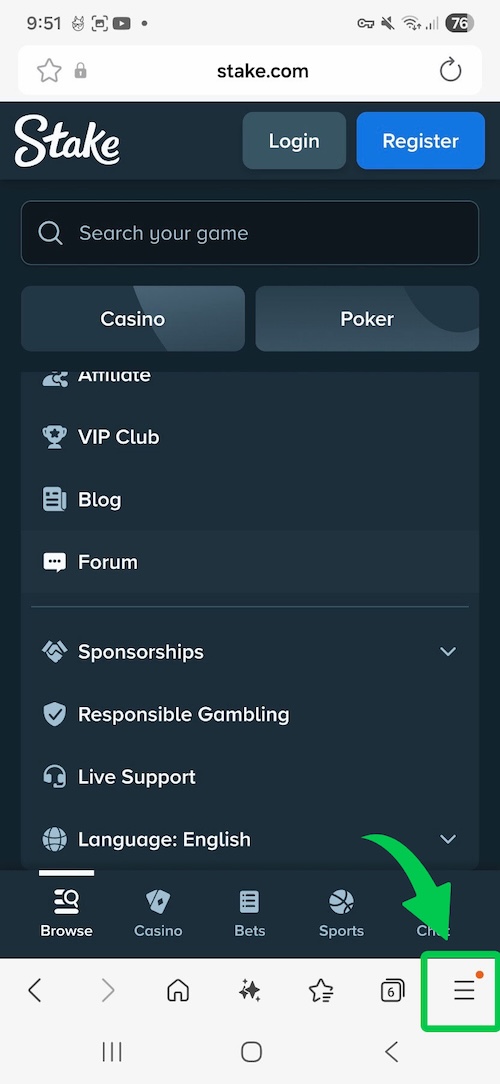
Open the browser menu
Tap the three-dot menu icon in the top-right corner of Chrome.
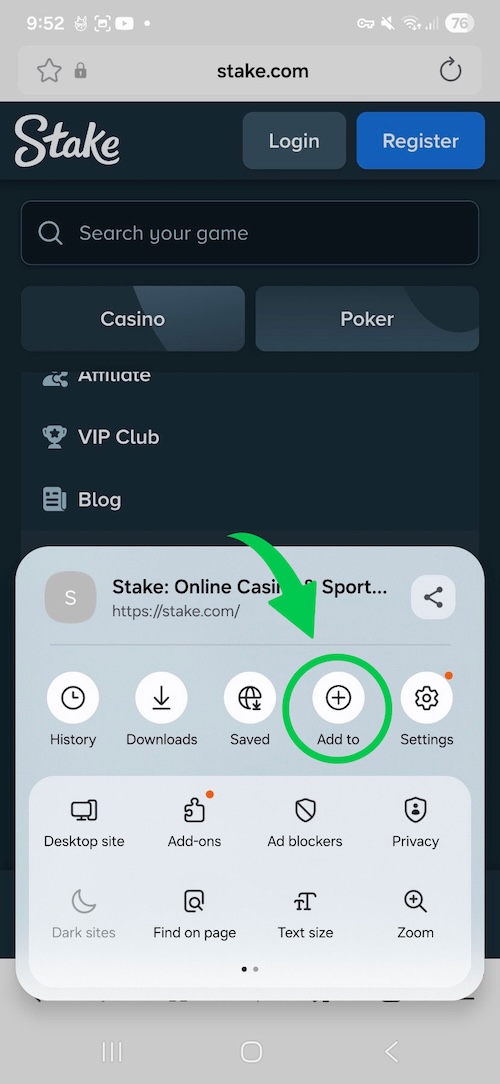
Step 3 of 6
Tap Add to
In the browser menu, tap “Add to”.
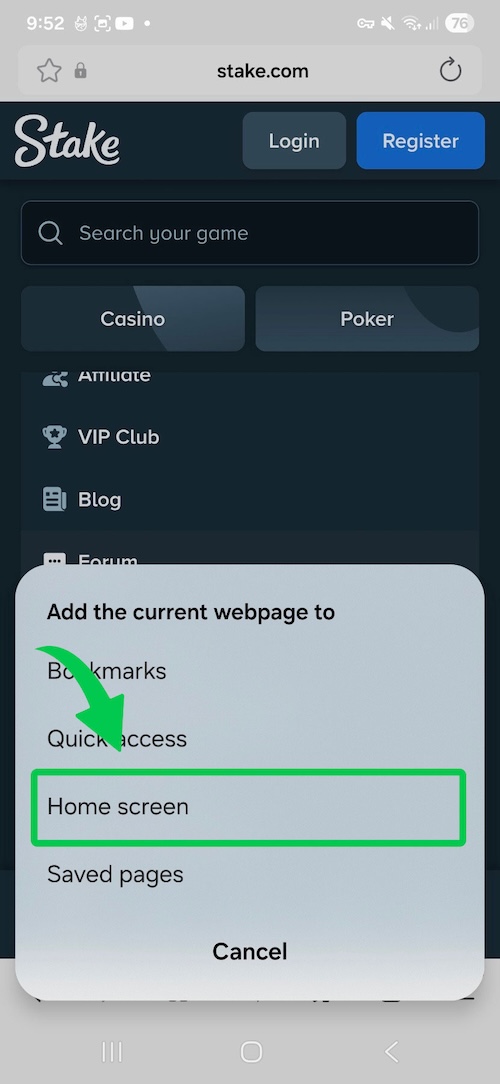
Step 4 of 6
Install or add to home screen
Select “Install app” or “Add to Home screen” from the menu.
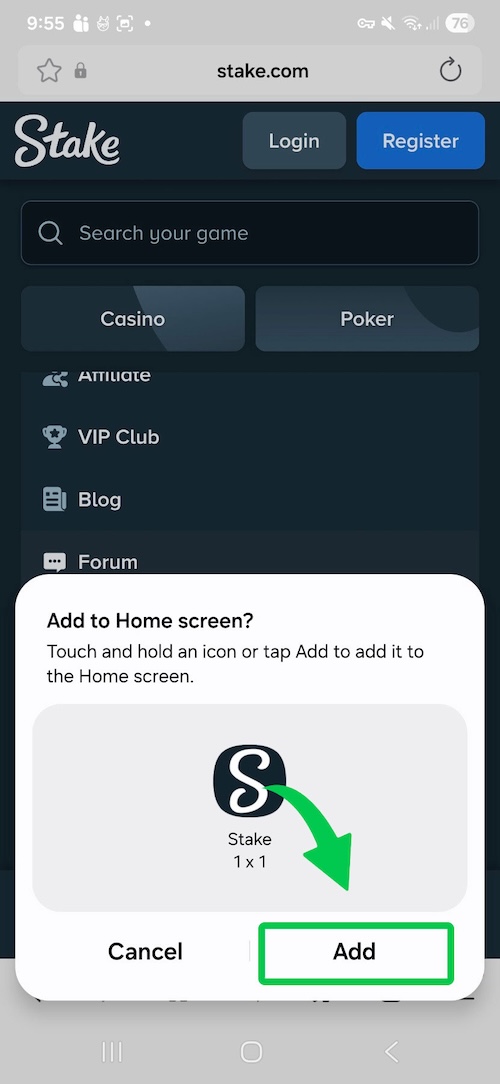
Step 5 of 6
Confirm installation
Tap “Install” or “Add” on the confirmation prompt.

Step 6 of 6
Use Stake like a native app
Open Stake from your app drawer or home screen — full-screen, fast access.
Tip: Avoid unofficial APK files. Only use Chrome’s install option from the official Stake website.
Stakebonus closely follows Stake’s mobile platform updates, browser app functionality and mobile betting experience across iOS and Android devices.
Our findings: Stake primarily promotes a browser-based mobile experience instead of a traditional standalone gambling application.
Stake does not currently rely on a dedicated standalone app for Stake.com or Stake.us. Instead, players can access the platform through a mobile browser and save it to their home screen for faster access.
There is no need to download anything, just access the casino as you would via a desktop, laptop or tablet.
Enabling the auto-rotate feature in settings will allow for better screen space usage.
Quick Guide: How to Install Stake App on iOS (Safari)
- Open Stake: Go to stake.com or stake.us in Safari on your iPhone or iPad.
- Tap Share: Press the Share icon at the bottom of the screen (square with an arrow).
- Add to Home Screen: Scroll down the menu, tap “Add to Home Screen”, and confirm.
Stake on iOS Devices
Stake can be accessed on iPhone and iPad through Safari or another mobile browser. In some regions, users may also see app-related options depending on local restrictions, but the browser-based experience remains the most reliable way to use Stake on iOS.
iOS users can save Stake to their home screen for faster access. This creates an app-like shortcut without requiring a traditional App Store download.
Quick Guide: How to Install Stake App on Android (Chrome)
- Open Stake: Visit the official website using Google Chrome on your Android phone.
- Open Menu: Tap the three-dot menu icon in the top-right corner of the browser.
- Install App: Select “Install app” or “Add to Home screen” and confirm the setup.
Android workaround (without Google Play)
Stake is not available as a traditional Android app in Google Play. Because of regional restrictions and gambling policies, many users access Stake through the browser-based mobile app instead.
Be Careful With Unofficial APK Files
Many websites offer Stake APK downloads that are not connected to official Stake platforms. Installing unofficial files may expose your device to security risks, fake login pages or malware.
Stake PWA App Common Problems
If Stake is not loading correctly on your mobile device, the issue is often related to browser settings, outdated software or regional restrictions. Here are some issues why the app won’t work properly:
- The mobile browser version does not open properly
- The home screen shortcut stopped working
- Stake loads slowly on mobile data
- The “Add to Home Screen” option is missing
- The site appears blocked in certain regions
- Login sessions expire unexpectedly
How to Fix Stake Mobile Issues
- Update your mobile browser to the latest version
- Clear browser cache and cookies
- Try opening Stake in another browser
- Disable aggressive ad blockers or browser extensions
- Recreate the home screen shortcut if necessary
- Restart your device and internet connection
Stake App Bonus
Stake mobile users can access the same core bonus areas available on desktop. You can also use the STK4U Stake bonus code to get the 200% welcome bonus that can reach up to $3000.
Stakebonus has not identified a separate category of mobile-only promotions at the moment. Mobile users can still access welcome offers, VIP rewards, reload bonuses and ongoing campaigns directly through the browser version.
App Privacy
Using the Stake browser app is completely safe. The platform uses advanced encryption to protect your data and complies with standard KYC/AML regulations.
Stake App Pros & Cons
- Pros
- No traditional download required
- Works through mobile browsers
- Can be saved to the home screen
- Supports casino, sportsbook, bonuses and VIP features
- Cons
- No standard Android app in Google Play
- Availability may depend on region
- Unofficial APK files can be risky
Our Stake Mobile Experience
During testing, the mobile browser version performed smoothly across both Android and iOS devices. Navigation, betting markets, casino games and VIP features loaded quickly and adapted well to smaller screens.
FAQs
How to use the Stake browser app?
You can use Stake on mobile by opening Stake.com or Stake.us in your browser. On iOS and Android, you can also save the site to your home screen for app-like access.
Can I get a bonus on Stake mobile?
Yes, you can get the amazing 200% welcome bonus with the Stake promo code STK4U. Use it while signing up to unlock the proposition.
What is the difference between Stake mobile and desktop?
The main difference between the app and the desktop version is in optimization. Stake designed its app for smaller screens, whereas the desktop site focuses on larger ones.
Is there a Stake apk file?
No, there’s no standalone Stake apk file, at least when it comes to an official one. You could find an unofficial apk file online for Android, but we advise against it.
Can I use the Stake app in the US?
Stake.us can be accessed on mobile in supported US regions through the browser version or home screen shortcut.
Is the Stake app safe to use?
Yes, the Stake app is safe to use because it features all of the security features found on the desktop platform. You have access to all of the encryption tech and everything else.